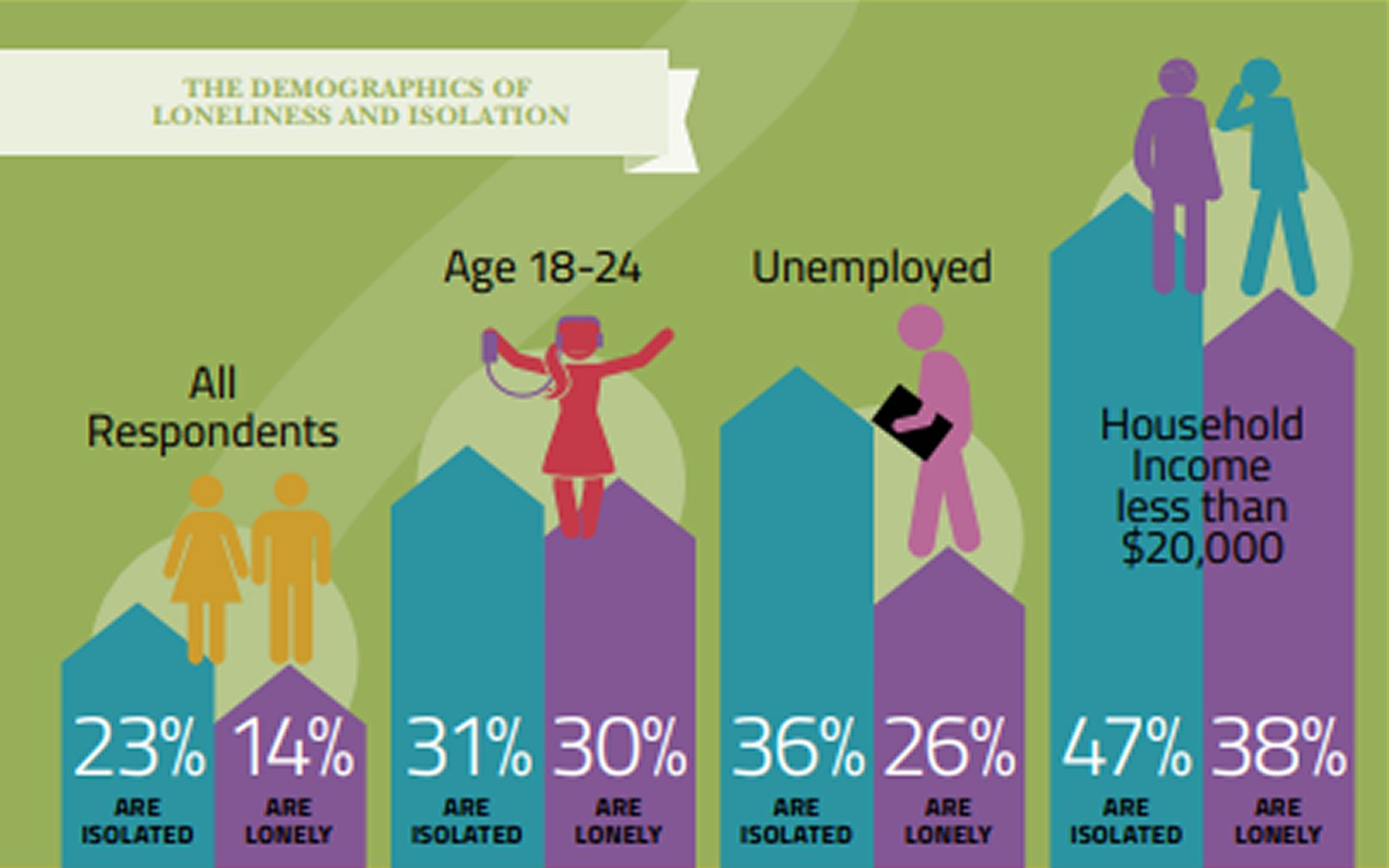
Vancouver is often celebrated for its stunning landscapes and high quality of life. However, it has also earned a less favorable reputation as one of the loneliest cities in the world. A 2012 survey by the Vancouver Foundation found that one in three residents reported difficulty making friends, and one in four felt alone more often than they would like. This growing concern led to the creation of the Engaged City Task Force, an initiative designed to foster stronger community connections.
A follow-up report further revealed that many Metro Vancouver residents tend to avoid public interactions with strangers and struggle to build meaningful new relationships. The report emphasized that a significant number of people do not feel connected to their neighborhoods or communities (Vancouver Foundation – Connect & Engage).
In response to this ongoing challenge, I created People and Laughter—an interactive prototype designed to reduce urban isolation by helping users discover local events, join recurring activity-based groups (such as soccer or art walks), and connect with others in meaningful ways. By promoting real-world social interaction, the project aims to support a more engaged, emotionally connected community in Vancouver.
Interactive Prototype: View the Figma Prototype
Introduction
Problem statements + how might we
user personas
This is a personal project that I developed independently to address the issue of social isolation in Vancouver.
Project Tasks:
Project concept, Research, Wireframing, Design, Prototyping
Tools:
Figma
Timeframe:
4 weeks
Objectives:
To combat social isolation in Vancouver by creating an interactive platform that encourages users to discover local events, join recurring activity groups, and easily share event details with friends. By promoting both spontaneous and planned social interactions, the app aims to foster stronger community connections and reduce loneliness, helping residents engage with others and build meaningful relationships outside of their homes.
- Social Isolation in Vancouver: Social isolation is a significant issue in Vancouver, often described as one of the loneliest cities in the world. A 2017 report by the Vancouver Foundation highlighted the extent of social loneliness, with many residents struggling to form meaningful connections. This issue calls for innovative solutions that go beyond event discovery to foster real, lasting social engagement.
- Impact of Acts of Kindness on Loneliness: Research from the University of British Columbia (UBC Psychology) shows that engaging in acts of kindness can help reduce loneliness. Participants who performed daily acts of kindness reported a decrease in feelings of loneliness and an increase in social interactions. This insight helped shape People and Laughter, encouraging users to engage in recurring activities that foster ongoing social connections and friendships.
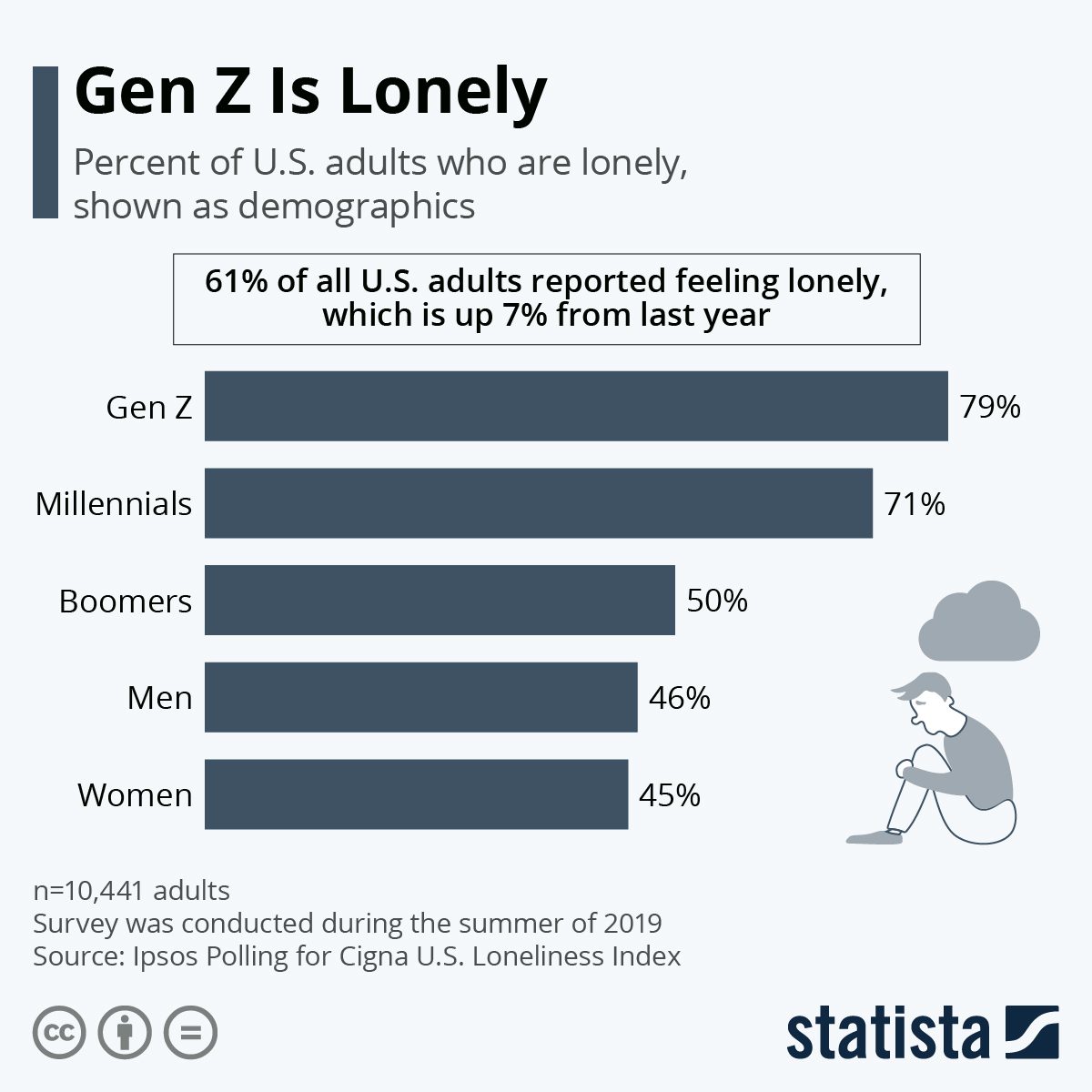
- Technology-Based Interventions to Combat Loneliness: Technology has emerged as an effective tool in addressing loneliness, particularly among young adults. A review published in Frontiers in Psychology emphasized the positive impact of online counseling and social media platforms in fostering social connections and providing accessible support. People and Laughter integrates technology to make social interaction easier and more consistent, combining event discovery with user-friendly features for socializing.
- Role of Community Engagement in Reducing Loneliness: Participating in community programs and activities can significantly reduce loneliness, providing a sense of belonging and support. A study published in BMC Public Health highlighted the importance of social support networks for individuals, especially those who face homelessness. By encouraging regular local events, People and Laughter facilitates the creation of these essential support systems, helping users connect meaningfully with others.
- Benefits of Outdoor Activities for Mental Health: Outdoor activities have long been linked to improved mental health, offering benefits such as reduced stress and better overall well-being. Research in the Interactive Journal of Medical Research found that exposure to nature significantly contributes to mental health improvements. People and Laughter promotes outdoor group events like soccer or hiking, allowing users to combine the social aspects of these activities with their mental health benefits.
- Social Activities and Life Satisfaction: Engaging in diverse social activities can significantly enhance life satisfaction, particularly for older adults. A study in Frontiers in Public Health emphasized that social participation reduces loneliness and increases happiness. People and Laughter aims to provide users with various event options, allowing them to engage in social activities that enhance their well-being and foster lasting connections.
- Physical Health Benefits of Outdoor Activities: In addition to mental health benefits, outdoor activities also promote physical well-being. According to the U.S. Forest Service, spending time in green spaces encourages physical activity, which in turn improves sleep quality, reduces the risk of chronic diseases, and increases life expectancy. People and Laughter leverages the benefits of outdoor activities, encouraging users to participate in social events that contribute to both physical and mental health.
research

People and laughter
Research
prototyping
2025
UX Design
Daniel (22)
Problem Statement: Daniel is a recent graduate who needs an intuitive app interface that helps him discover nearby social events because he feels isolated after moving to a new city for work.
How might we:
• Help Daniel easily discover and join local events that match his interests?
• Make it less intimidating for Daniel to meet new people in a casual setting?
• Help Daniel build long-term social connections in a new city?
Mia (29)
Problem Statement: Mia is a newcomer to Vancouver who needs personalized recommendations for outdoor activities and social programs because she feels disconnected and lonely after moving from her home country.
How might we:
• Connect Mia to local outdoor activities that feel welcoming and inclusive?
• Tailor activity suggestions based on Mia’s preferences and comfort level?
• Support newcomers like Mia in building meaningful friendships in their new city?
Kevin (28)
Problem Statement: Kevin is unemployed and needs a cost-conscious platform that prioritizes low-cost or free events because his budget is tight, but he still wants to engage socially and reduce feelings of isolation.
How might we:
• Make it easy for Kevin to find free or low-cost social opportunities?
• Help Kevin feel empowered to participate without financial stress?
• Encourage community building through affordable events and programs?
Persona 1: Daniel, 22, Recent Graduate
Daniel is a recent graduate who needs an intuitive app interface that helps him discover nearby social events because he feels isolated after moving to a new city for work.
Goal: To find local social events that help build a new social circle in his new city.
Awareness: Daniel moves to a new city for work and feels disconnected from peers. He starts looking for ways to meet people. (Touchpoint: The app sends a notification highlighting nearby “Meetup Events for Young Professionals in Your Area.”)
Consideration: Daniel opens the app and browses events under the “Social Gatherings” section, with options to filter by location, event type, and price. (Touchpoint: He selects a casual dinner meetup and sees event details, reviews from past attendees, and the opportunity to ask questions to the event organizer.)
Decision: Daniel decides to attend the meetup and confirms his attendance. (Touchpoint: The app provides him with an RSVP feature, event location with a map, and automatic calendar syncing.)
Participation: Daniel attends the event, interacts with other young professionals, and exchanges contact information. (Touchpoint: After the event, the app asks for feedback, recommends additional similar events, and invites Daniel to join a new event group chat.)
Engagement: Daniel becomes more active in social events and grows his professional network. (Touchpoint: The app personalizes recommendations based on his interests and social preferences, helping Daniel stay engaged with relevant community activities.)
Persona 2: Mia, 29, Newcomer to Vancouver
Mia is a newcomer to Vancouver who needs personalized recommendations for outdoor activities and social programs because she feels disconnected and lonely after moving from her home country.
Goal: To discover free outdoor activities and local community programs to make new friends and feel connected.
Awareness: Mia, a newcomer to Vancouver, feels isolated and seeks out community events and activities that align with her interests. (Touchpoint: A welcome message within the app offers her a guide to free or low-cost “Local Activities & Social Events for Newcomers in Vancouver.”)
Consideration: Mia opens the app and filters the recommendations by “free events,” “outdoor,” and “beginner-friendly,” browsing options like nature walks or park meetups. (Touchpoint: She views event details and ratings from other newcomers and sees a calendar of upcoming events.)
Decision: Mia selects a walking tour through Stanley Park that offers both outdoor exploration and social interaction afterward. (Touchpoint: The app offers an RSVP button and automatically adds the event to her phone’s calendar with a map and directions.)
Participation: Mia attends the event, enjoys the walk, and connects with others afterward in a social gathering. (Touchpoint: The app encourages Mia to share her experience, rate the event, and suggests a follow-up community meetup.)
Engagement: Mia finds regular activities and events that help her feel more integrated into the community. (Touchpoint: The app sends tailored recommendations for similar events and activities, and Mia receives reminders for new upcoming events.)
Persona 3: Kevin, 28, Unemployed
Kevin is unemployed and needs a cost-conscious platform that prioritizes low-cost or free events because his budget is tight, but he still wants to engage socially and reduce feelings of isolation.
Goal: To find affordable or free community programs and activities that allow him to socialize without financial pressure.
Awareness: Kevin, struggling with unemployment, feels disconnected from his social circle and wants to find low-cost events. (Touchpoint: The app sends a push notification showcasing “Affordable Community Programs for People Looking to Connect.”)
Consideration: Kevin opens the app and uses filters to focus on free or low-cost events like skill-building workshops, social support groups, or volunteer opportunities. (Touchpoint: He finds a local volunteer event that aligns with his interests and sees it’s a good opportunity to meet people.)
Decision: Kevin selects the volunteer opportunity at a nearby food bank and confirms his participation. (Touchpoint: The app allows Kevin to easily RSVP and shows event details, with options to share the event with friends.)
Participation: Kevin attends the volunteer event, helps with community outreach, and builds new connections with like-minded individuals. (Touchpoint: After the event, the app encourages Kevin to rate his experience and suggests similar volunteer events or programs.)
Engagement: Kevin continues to use the app to find more affordable or free events and community groups, gradually expanding his social network. (Touchpoint: The app continues to personalize event recommendations based on Kevin’s preferences, making sure they fit within his budget and interests.)
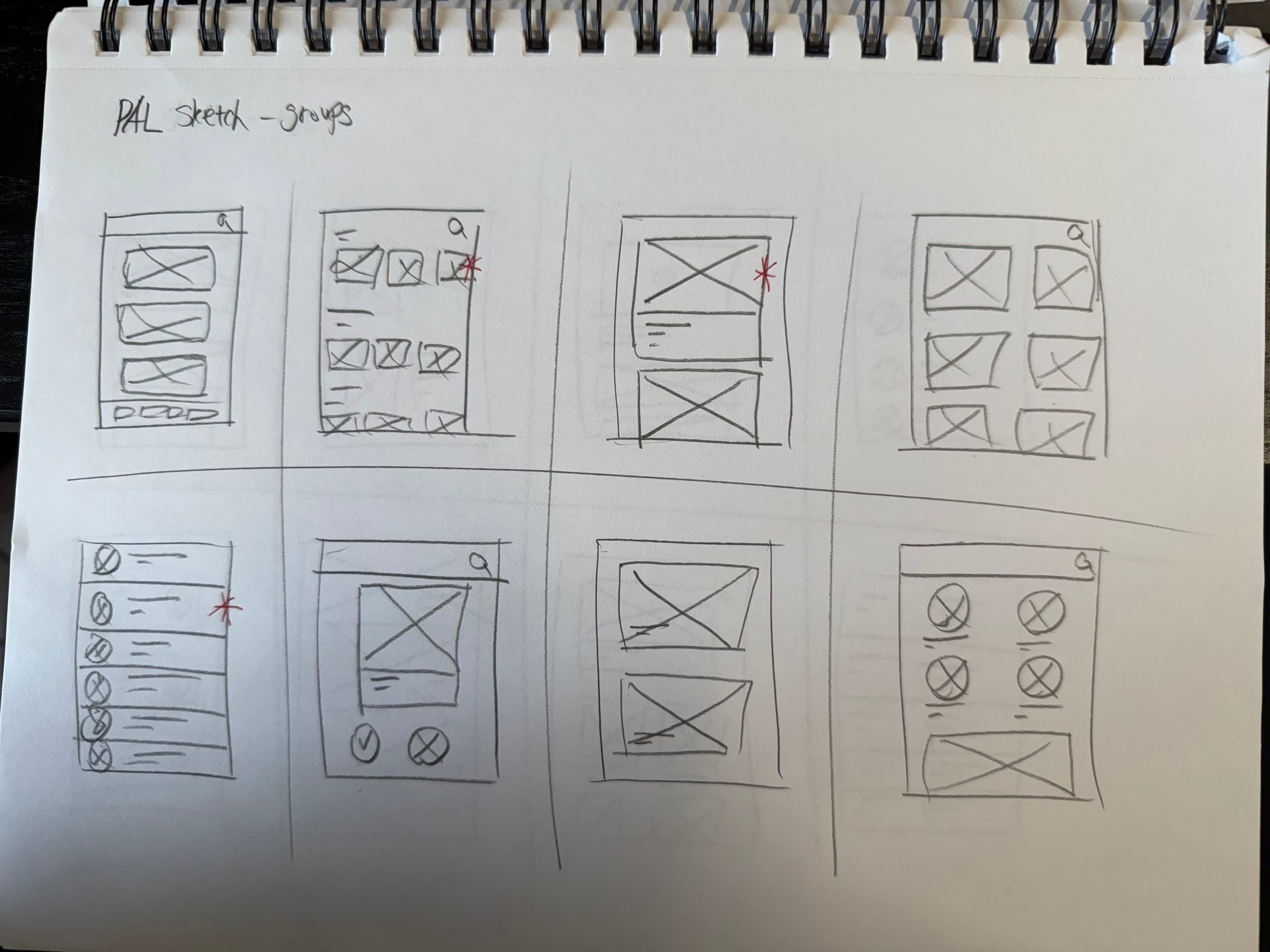
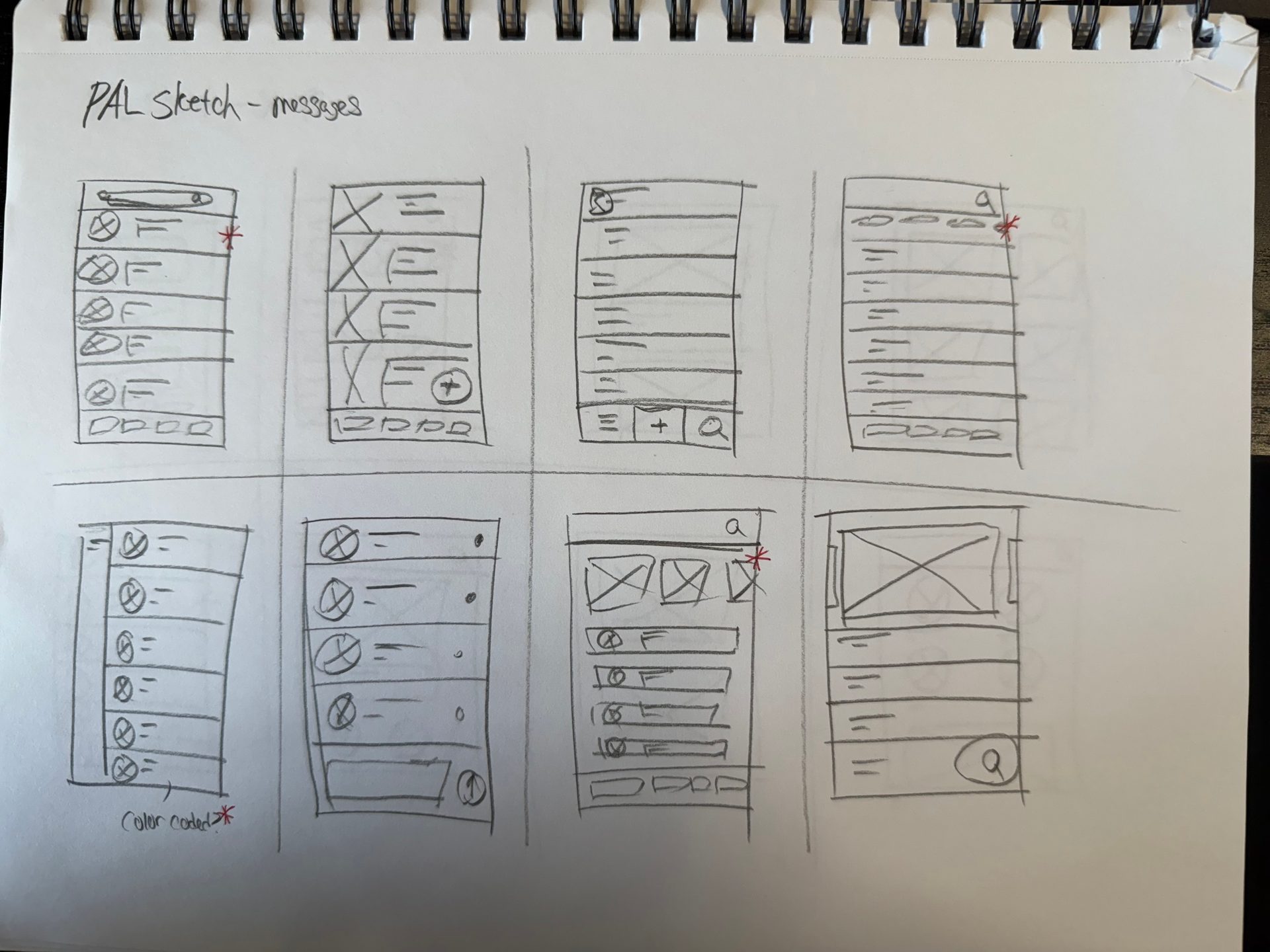
To explore diverse layout possibilities, I used the Crazy 8’s method for four main pages: Home, Groups, Messages, and Tips. Each session pushed me to rapidly sketch 8 distinct ideas in under 8 minutes per page.
After generating a wide range of layouts, I highlighted and combined the most effective elements from each sketch to inform the final wireframes. This allowed me to explore various interaction patterns and visual structures quickly, while staying grounded in user needs from my personas.
Although the Tips page was initially explored, it was ultimately discarded due to redundancy and limited user value in early testing.
Designing this project was both an insightful and rewarding experience. The goal from the beginning was clear: to address the issue of social isolation, particularly for individuals new to a city or facing barriers to social engagement. Through in-depth user research and persona development, I was able to understand the unique challenges faced by different groups, such as recent graduates, newcomers, and individuals facing financial hardship. These personas were instrumental in guiding design decisions throughout the process, ensuring that the app met real user needs in an empathetic and accessible way.
The ideation process pushed me to explore a wide range of ideas through the Crazy 8’s method. Rather than settling on a single layout from the start, I challenged myself to think broadly across different screens—home, groups, messages, and tips. From there, I selected and combined elements that felt the most intuitive and relevant to my users. This stage allowed me to focus on clarity and usability while experimenting with layout possibilities, ultimately leading to wireframes that balanced functionality and user engagement.
Moving from low-fidelity wireframes to a high-fidelity prototype in Figma was where the design truly came to life. I focused on creating a clean and welcoming visual language that encouraged exploration without overwhelming the user. Each interaction was carefully thought out, from discovering local events to joining group chats and receiving personalized suggestions. Even though I didn’t conduct user testing or implement the app in a live environment, building out the interactive prototype helped me better understand how users might navigate and experience the product in a real-world context.
This project was a valuable opportunity to translate complex social challenges into actionable design solutions. It taught me the importance of aligning user needs with design intent and how even simple digital tools—when thoughtfully crafted—can play a meaningful role in improving people’s daily lives. If given the chance to continue the project, I would prioritize usability testing and iteration based on real user feedback, as well as explore partnerships with local organizations to expand the platform’s reach.
Overall, this project not only strengthened my UX skills—from research and ideation to prototyping—but also reaffirmed my belief that design can be a powerful tool for social good.
Reflection
conclusion
ideation
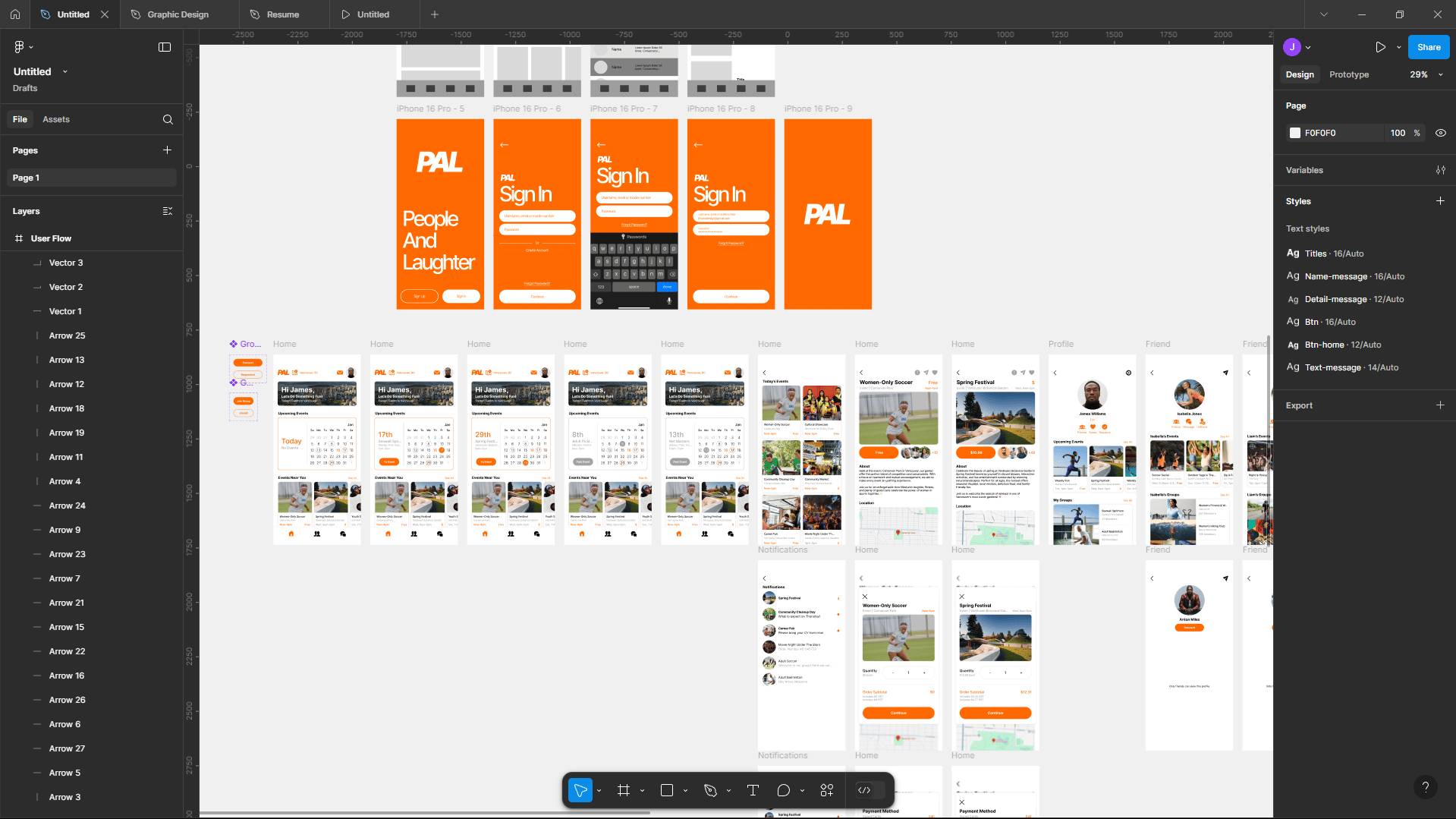
After finalizing the wireframes, I moved into the high-fidelity stage using Figma. This phase focused on applying visual design elements such as typography, color schemes, icons, and spacing to bring the interface to life. I incorporated UI components that align with the brand’s tone while ensuring accessibility and clarity. The goal of this stage was to closely represent the final product, allowing stakeholders and potential users to visualize how the app would look and feel during real use. This step also helped refine interactions, hierarchy, and overall user experience before moving into prototyping.
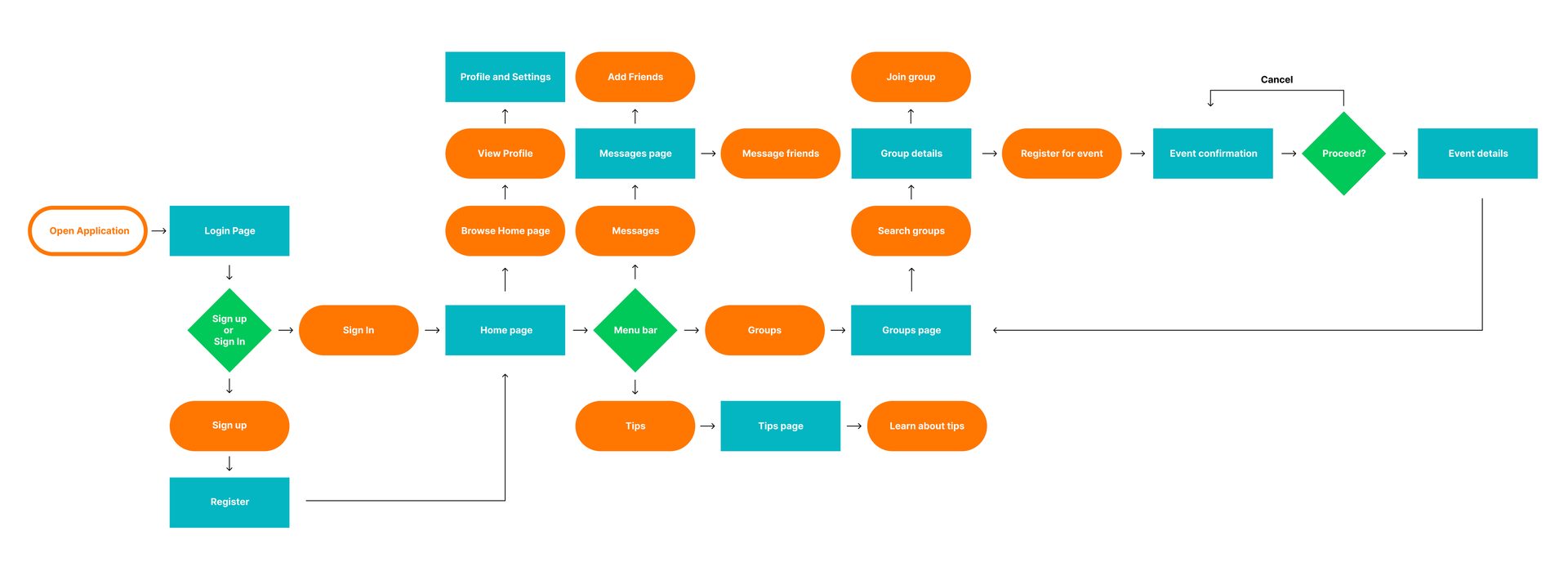
User flow
wireframes
prototyping
high-fidelity user interface
Once the high-fidelity wireframes were finalized, I moved on to the prototyping phase to turn the static designs into interactive mockups. This phase allowed me to simulate user interactions and demonstrate how the app would behave in real-world scenarios. Here’s how I approached the prototyping stage:
Turning High-Fidelity Wireframes into Interactive Screens: Using Figma, I linked together all the high-fidelity screens I created, setting up user flows that reflected the app’s functionality. The goal was to make the user experience feel intuitive and seamless, ensuring that all touchpoints like buttons, menus, and interactions were clearly defined and connected.
Incorporating Interactive Elements: In this phase, I focused on adding interactive components to the wireframes, including buttons, sliders, and clickable areas. By defining hotspots on different parts of each screen, I was able to simulate the user's ability to interact with the app. This was crucial for showing how users would navigate between different pages like the Home, Groups, and Messages screens.
Creating Transitions and Animations: I added transitions between pages and interactions to enhance the app’s fluidity. For example, when a user clicks on a button or moves between screens, there are smooth animations and transitions that make the experience feel more natural. This also allowed me to visualize how different states of the app (like a loading screen or error message) would behave.
User Flow Testing: After setting up the prototype, I tested the user flows by clicking through the app and making sure everything worked as expected. I wanted to ensure that users could easily navigate through each screen, from discovering local events to messaging friends. I paid attention to the ease of navigation and the intuitive placement of key features to ensure a smooth user experience.
Gathering Feedback: With the interactive prototype in hand, I was able to gather feedback from peers and potential users. The feedback was essential in understanding how users would interact with the app, what felt intuitive, and where improvements could be made. I used this feedback to iterate on the design, refining the app’s functionality before moving into the final stages.
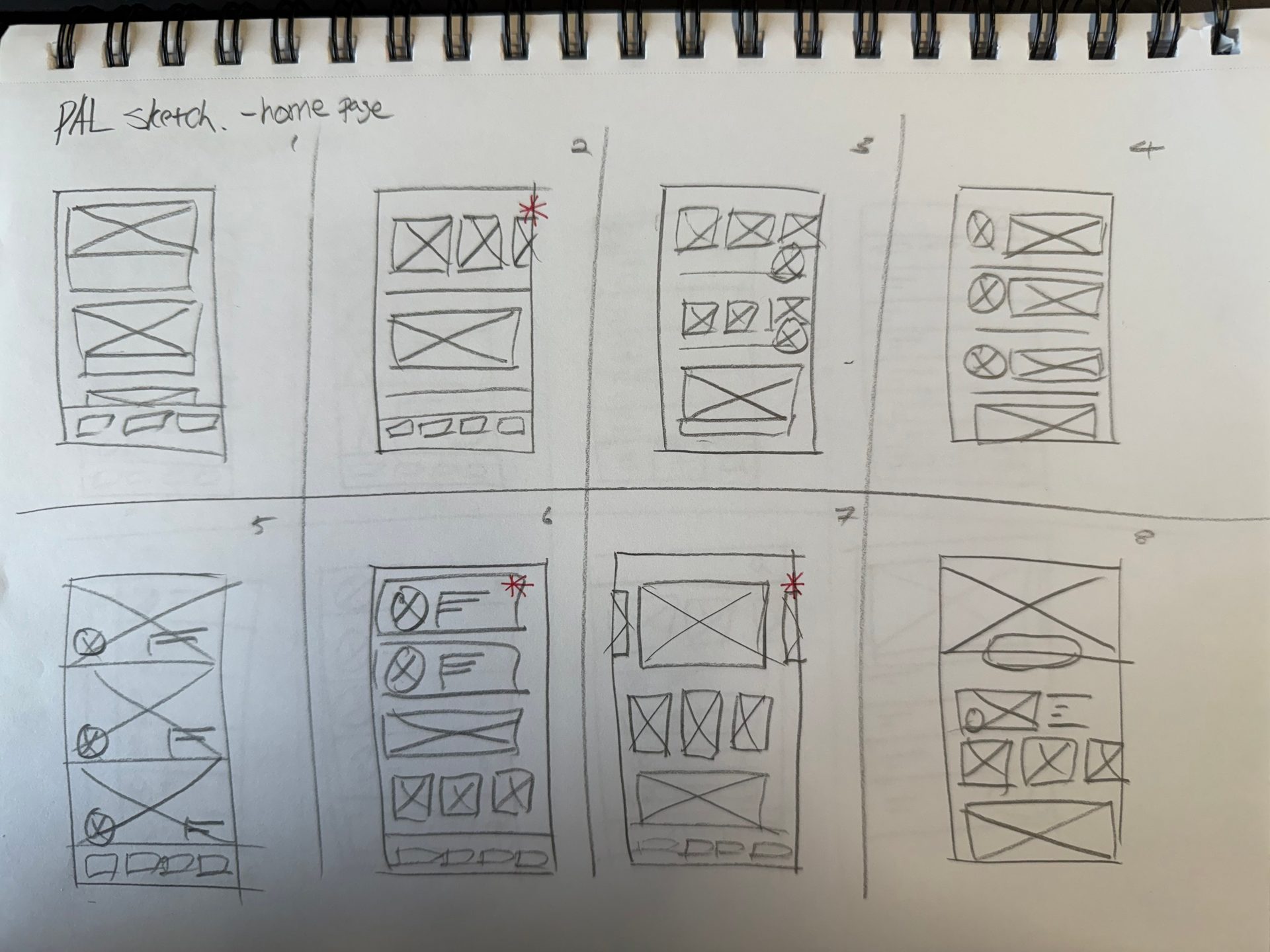




Low-fidelity wireframe for home page
Low-fidelity wireframe for groups page
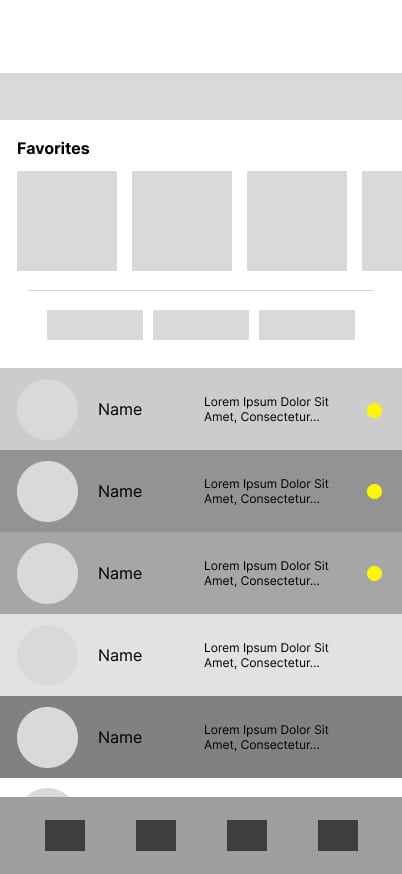
Low-fidelity wireframe for messages page